April 30, 2025, 2 Comments
Top Compatible CCcam Receivers in 2026: A Complete Guide
Stay Connected with the Best Devices for Seamless Satellite TV Viewing
If you’re planning to enjoy satellite TV through a CCcam server, choosing the right receiver is just as important as finding a reliable server provider. A compatible receiver ensures smooth decryption, stability, and high-quality viewing. In this article, we’ll go over some of the best and most popular CCcam receivers in 2025, ideal for users of cccam.eu.
✅ What is a CCcam-Compatible Receiver?
CCcam receivers are satellite receivers (or decoders) that support the CCcam protocol, a method used to share smartcard access over a network. These receivers can connect to a CCcam server using a network connection, allowing you to unlock scrambled channels from providers.
🧩 Features to Look for in CCcam Receivers
Before we dive into the list, here are the features you should prioritize:
- Linux-based or Enigma2 OS
- Internet connectivity (Ethernet or Wi-Fi)
- Support for SoftCam (CCcam, OSCam, etc.)
- Regular firmware updates
- USB ports and expandable storage
📺 Top CCcam Receivers (2025 Edition)
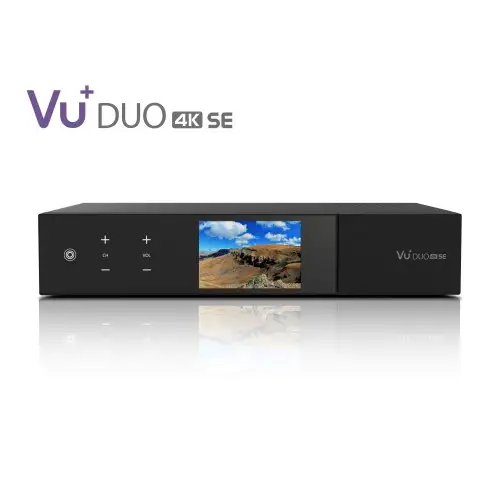
1. Vu+ Duo 4K SE – CCcam
- Operating System: Enigma2 (Linux)
- Key Features: Dual tuner, 4K support, powerful processor, wide plugin support
- Why It’s Great: One of the most powerful Enigma2 receivers, ideal for multi-room setups or heavy CCcam users.
2. Dreambox DM920 UHD – CCcam
- Operating System: Enigma2
- Key Features: UHD/4K resolution, dual-core processor, CI slot, SSD support
- Why It’s Great: Excellent image quality and long-term support from a reputable brand.
3. Zgemma H9S SE – CCcam
- Operating System: Enigma2
- Key Features: 4K UHD, single satellite tuner, compact design
- Why It’s Great: Budget-friendly choice for beginners who want reliable CCcam functionality.
4. Octagon SF8008 – CCcam
- Operating System: Enigma2 & Android (dual boot)
- Key Features: 4K UHD, HEVC support, CI+ slot, fast boot time
- Why It’s Great: Offers the flexibility of Android apps with powerful CCcam performance.
5. Formuler F4 Turbo
- Operating System: Enigma2
- Key Features: Fast zapping, IPTV support, customizable UI
- Why It’s Great: Affordable and lightweight, but still fully capable of running CCcam.
🔧 How to Set Up CCcam on Your Receiver
- Install a compatible image (OpenATV, OpenPLI, etc.)
- Access FTP or SSH to navigate to
/etc/directory - Upload your CCcam.cfg file with your line details (provided by fullcccam.eu)
- Install CCcam plugin (if not pre-installed)
- Restart SoftCam and enjoy unlocked channels!
💡 Final Tips
- Always update your receiver’s firmware for the latest security and compatibility fixes.
- Use a wired Ethernet connection for better stability when streaming via CCcam.
- Choose a trusted CCcam provider like cccam.eu for reliable uptime and quality support.
Ready to unlock premium channels?
Get started today with one of these compatible receivers and a premium CCcam Server from cccam.eu.
Frequently asked questions
Which receivers work best with CCcam in 2026?
Enigma2 (Linux) based receivers remain the best choice, and the models covered in this guide – Vu+ Duo 4K SE, Dreambox DM920 UHD, Zgemma H9S SE, Octagon SF8008 and Formuler F4 Turbo – all run CCcam reliably. Look for a box with Ethernet, SoftCam support and regular firmware updates.
Do I need an Enigma2 receiver to use CCcam?
Enigma2 is the most widely supported platform for CCcam, with images like OpenATV and OpenPLI offering easy SoftCam installation. Other Linux receivers that support the CCcam protocol over a network connection can also work, but Enigma2 gives you the smoothest setup and the widest plugin support.
Can I still use an older satellite box with CCcam in 2026?
Yes, as long as it runs a Linux or Enigma2 image with SoftCam (CCcam or OSCam) support and has a working internet connection. Keep the firmware updated and use a wired Ethernet connection for the most stable viewing.
How do I add a CCcam line to my receiver?
Upload your CCcam.cfg file with your line details to the /etc/ folder via FTP, then restart the SoftCam plugin. Your line is delivered instantly by email after ordering, and every account includes two servers (Server 1 and Server 2) for backup. Follow our step-by-step CCcam setup guide for Enigma2 for full instructions.
Can I test a CCcam server before buying?
Yes, you can get a free 48-hour trial with no card required at portal.cccam.eu/trial. Fair use applies: one receiver watching one channel at a time.




How To Buy CCcam Server: Step-by-Step Guide | Europe CCcam Server
April 30, 2025[…] A CCcam server is a specialized service that allows users to access encrypted satellite television channels by sharing decryption keys over the internet. This enables seamless viewing of premium TV content on compatible satellite receivers4. […]
Best OSCam Receiver In 2025: The Ultimate Guide To Buy OSCam | Europe CCcam Server
April 30, 2025[…] Check OSCam Support: Confirm the model supports OSCam and, if needed, CCcam for maximum flexibility13. […]
Comments are closed.